
Build and Kill Zombies Controls
Every labeled key and HUD tile on the lobby pad and in Drive.
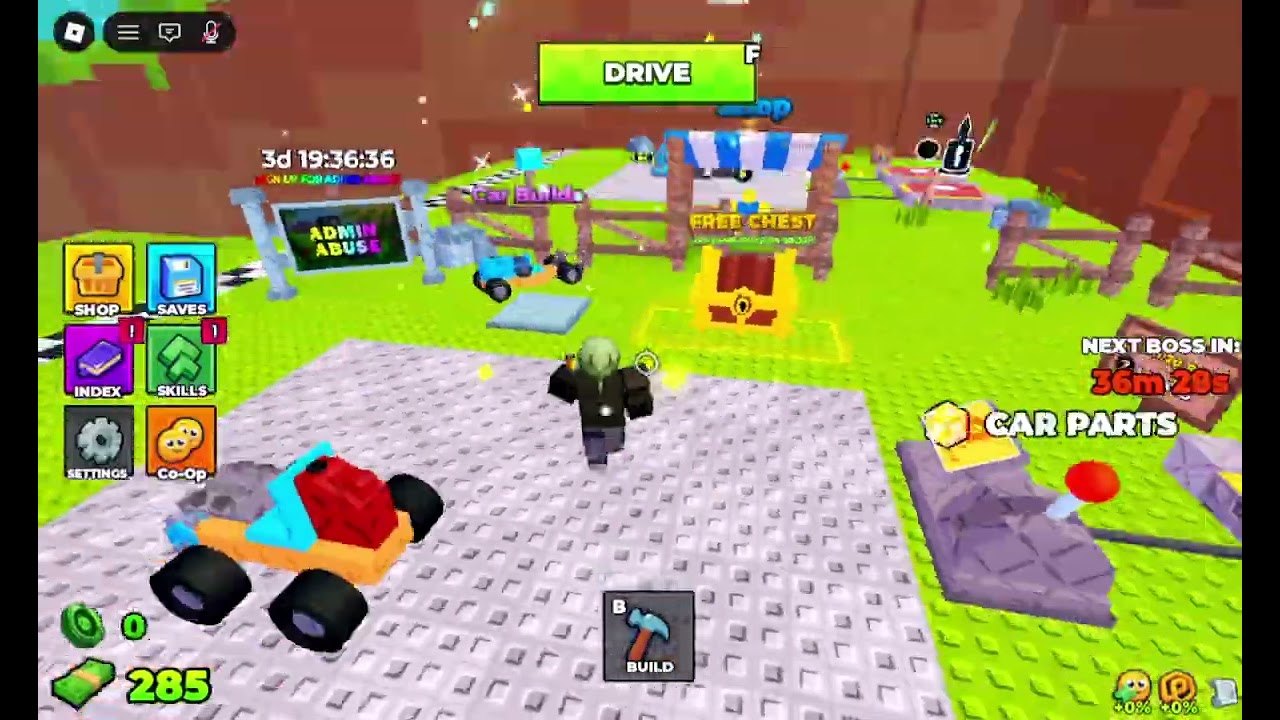
Build and Kill Zombies uses two named keys and a stack of HUD tiles. If you treat it like a generic Roblox tycoon you will open Shop when you meant to Drive. If you treat it like the 2025 checkpoint-car game you will look for a fuel gauge that does not exist. This page is the control sheet.
Named keys
| Input | Action | Where it lives |
|---|---|---|
| F | Drive | Green DRIVE button, top center of the lobby |
| B | Build | Hammer tile, bottom center of the lobby |
| WASD / thumbstick | Move on foot or steer in Drive | Standard Roblox |
| Jump | Hop on the pad | Standard Roblox; not a Drive boost |
| Camera drag | Look around the stall | Useful while placing a plow |
F and B are printed on the HUD. On mobile they are the on-screen DRIVE and BUILD buttons. On console they map to the on-screen prompts. There is no separate “enter vehicle” key — Drive is enter.
Left stack (lobby)
Top to bottom as shown in lobby captures:
- SHOP — Exclusive Shop (Robux packs + Community Codes) and other purchases.
- SAVES — Kart snapshots. Use after every build change.
- INDEX — Catalog / collection, not a weapon.
- SKILLS — Talent purchases. See skills.
- SETTINGS — Audio, sensitivity, other client options.
- Co-Op — Online co-op entry. Servers hold up to five players.
A red pip on a tile means the UI wants attention (unsaved build, unclaimed shop, etc.). Clear pips before a boss clock hits zero.
Drive HUD
Once F is pressed the lobby stack hides behind the speed tools:
- Distance at the top (0 until you cross the checkered strip).
- studs/s under the kart (starter ~10).
- Speedometer needle.
- Part HP percents on bricks (100% healthy, 92% warning).
- NEXT BOSS IN still visible on the right.
- Coin and cash still visible on the left.
- Boost pips +0% / +0% until turbo or event buffs exist.
There is no handbrake key shown on the HUD. Stop by steering back to the pad or by losing the chassis. Do not hunt a hidden clutch.
World prompts
Walk into FREE CHEST, Car Parts, Support, and Car Builder. These are proximity stands, not keys. The group-chest claim after like-and-join is also a prompt; see group chest.
Mobile and console pitfalls
The software keyboard covers Redeem in Exclusive Shop. Dismiss it before you assume a code failed. BUILD and DRIVE sit on opposite edges so fat-thumb players swap them — look at the label. Co-Op on a phone is usable; Shop + Build at the same time is not. PC players in a five-stack should handle Saves and codes while mobile players ram.
What is not a control
- Chat is not a code box.
- Jump is not turbo. Turbo is a part / script-labeled AUTO TURBO, not a keybind on the starter HUD.
- The Roblox menu (Esc) is not Settings. Use the in-game Settings tile.
- Emotes do not ram zombies.
Learn F and B, then ignore the rest until getting started says to open Shop. When a boss window is close, the only keys that matter are F and the camera. Build after the fight, never during it — that rule lives on the boss guide.
Frequently Asked Questions
Quick answers for lobby, Drive, codes, and boss timers.
What key starts a Drive?
F, or the green DRIVE button at the top of the lobby HUD.
What key opens Build mode?
B, or the hammer BUILD tile at the bottom center.
Where is co-op?
The Co-Op tile on the left stack. The place supports online co-op with up to five players.
Is there a codes keybind?
No. Open Shop, then Exclusive Shop, then the Community Codes field.